Keep a copy of one calendar
inside another.
Point Calendar Mirror at a calendar you can see but can't share — a work schedule, a subscribed feed — and it keeps an up-to-date copy in a calendar you control. It only copies one way, so your original is never touched.

A copy you can actually use
Some calendars you can see but not share: a subscribed work schedule, a read-only team calendar, an account that isn't yours. Calendar Mirror copies one into a calendar you own — so you can reshare it, recolor it, or just see it beside everything else. And because the copy lives in your own account, it shows up on your phone and other devices on its own.
Any calendar into any other
Copy from one calendar into another, and set up as many pairs as you want.
One direction, always
The copy follows the original. Your original is never changed — and anything you add to the copy by hand stays put.
Repeating events just work
Weekly meetings, all-day events, the odd moved appointment — they all come across correctly.
No accounts, no passwords
It works through the calendars already set up on your device. Nothing to log into, nothing stored.
Out of your way
On Mac it sits in the menu bar — see that it's working, update now, or pause, all from a small icon up top. On iPhone and iPad it's the app itself.
Runs on its own
Pick how often it updates and forget about it. On Mac it keeps to the schedule. On iPhone and iPad it refreshes in the background when iOS allows, and a pull down updates it right now.
Copy the meetings, skip the noiseNew in 1.4.0
Not every event in a calendar is worth mirroring. A pair can skip the ones you declined, the ones you haven't answered, the ones the organiser cancelled, all-day events, and anything marked free — then narrow it further by length, by words in the title, and by a window of the day on the weekdays you choose.
This works on calendars you don't control. Tagging events one by one only works on events you wrote yourself — a subscribed work feed or an assigned-shifts calendar can only be filtered on what the events already say about themselves.

Declined and cancelled
A meeting you said no to isn't a commitment. Neither is one the organiser called off. Both can be dropped before they reach the copy.
Too short, too long
Skip anything under fifteen minutes, or over eight hours. Useful for stripping out reminders and week-long placeholders.
Working hours only
Copy only what falls between 8am and 6pm, Monday to Friday. An event counts if any part of it overlaps, so a 7am start still comes through.
Silent when it works. Loud when it stops.New in 1.4.0
A working pair writes nothing into your calendar at all. If one stops syncing, an all-day warning turns up in the destination — so you find out on your phone, without opening anything. It clears itself as soon as the pair recovers.
Older versions left a daily “last synced” note instead. On a calendar you share with other people, that was a marker all of them could see and none of them could use.
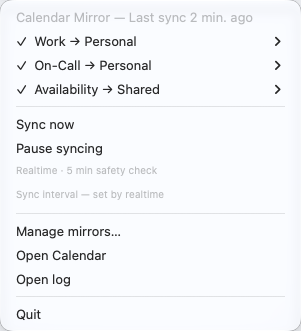
One glance at the menu bar
The icon says how things are going: a check when every copy is current, a warning if one has fallen behind, a cross if something is broken, a pause symbol when you've stopped it.
To add a copy, open the window and pick two calendars from your own list — the one to copy from, and the one to copy into (only calendars you can edit show up as the target).
Each pair opens onto its own settings, and every section folds down to a line that says what it’s set to, so a heavily-configured pair still reads at a glance.
A new icon, with five facesNew in 1.4.0
Not a generic checkmark — Calendar Mirror’s own icon, redrawn small enough to stay sharp at menu-bar size, wearing whichever face matches what’s happening.
 All goodEvery copy current
 BehindNot synced lately
 BrokenA copy is failing
 PausedYou stopped it
 Nothing set upNo copies yet
It notices when your calendar changesNew in 1.4.0
Instead of waiting for the next scheduled run, Calendar Mirror can watch for calendar changes and update the copy within seconds of one. A five-minute pass still runs underneath as a backstop — change notifications are best-effort, and it also repairs anything that got deleted by hand.
Seconds, not a schedule
Move a meeting and the copy follows almost immediately, rather than at the top of the next quarter hour.
Mac, built from source
This one is macOS-only, and only in the version you build yourself — not on iPhone, iPad, or the Mac App Store app, which keep to their schedules.
Then it’s up to iCloud
Calendar Mirror writes the copy fast. How quickly that copy reaches your other devices is iCloud’s business, on iCloud’s schedule.
The same pairs, in your pocket
The iPhone and iPad app shows every pair grouped by the calendar it copies into, with its health and how many events it’s managing. Pull down to sync right now; tap a pair to change what it copies.


Three steps, then it's automatic
Pick two calendars
Choose the one to copy from and the one to copy into — both already on your device.
It copies the events
Every event comes across, and the copy keeps matching the original as things change — one direction only.
See it everywhere
Since the copy lives in your account, it reaches your phone and other devices by itself.
Not sure this is the one?
Twelve other tools do some of what Calendar Mirror does. If you already subscribe to Fantastical, start with the mirroring you have already paid for — that page says so first.
Some of them can’t read an iCloud calendar at all. If one of those is what you want, Calendar Mirror can mirror your iCloud calendar into a Google calendar it can read, and the pages below walk through the setup.
Twelve comparisons
Every price checked against that company’s own site, dated, and linked.
On the App Store, or build it yourself
One purchase — $2.99 — covers iPhone, iPad and Mac. It keeps the lights on for an app with no ads, no accounts, and no data collection. The source is open either way.
Prefer to build it from source? It's free and MIT-licensed. It's also where 1.4.0 lives until it clears App Store review.
The open-source project is called
cal-mirror; on the App Store it's Calendar Mirror. Same app, same
engine — the shorter name is just what the repository has always been called.
git clone https://github.com/mattbaylor/cal-mirror.git
cd cal-mirror
./install.sh